
We keep updating. Quite a lot, actually. Some things you'd asked for. Others we knew were needed even if no one was making noise about them. And a handful of improvements that, if we're honest, just make the day-to-day a lot smoother. Because you know how we think: easy now, easy later. Let's get into it.
This update has several pieces that point in that direction. On one hand, we're adding a new way to notify Take Away orders via SMS, with manual control from the POS. On the other, we've significantly expanded the promotions system, adding segmentation, limits and more precise scheduling. We've also included improvements to the admin (such as the new schedule editor), along with some relevant changes around compatibility and legal configuration.
SMS for Take Away: manual notification from the POS
We've added the option to send SMS notifications for Take Away orders. The goal is simple: let you notify the customer at the exact moment their order is ready.
How it works
- Activation
- Not enabled by default
- Activated from the Admin Panel → Delivery section
- Sending the SMS
- Manual from the POS
- The user decides when to send the notification
- Send control
- Only one SMS per order
- Avoids duplicates and unnecessary costs
- Cost
- Same price as other SMS on the platform.

Promotions: more control, segmentation and new scheduling options
We've updated the promotions system to make it more flexible and dynamic.
New features
Uses per promotion and per user
- Unlimited promotions
- Or set limits for:
- Total number of uses
- Number of uses per customer
User segmentation
- Apply promotions to:
- All users
- Specific users
- Search by:
- Name
- Phone number
Time slots
- Configuration by:
- Days
- Hours
- Option to:
- Define multiple time slots on the same day
New scheduling options
- Ongoing
- Runs continuously until manually deactivated.
- Date range
- Defined start and end.
- Exact date and time
- For one-off actions (e.g. specific events).
This update is currently in beta and will roll out gradually.
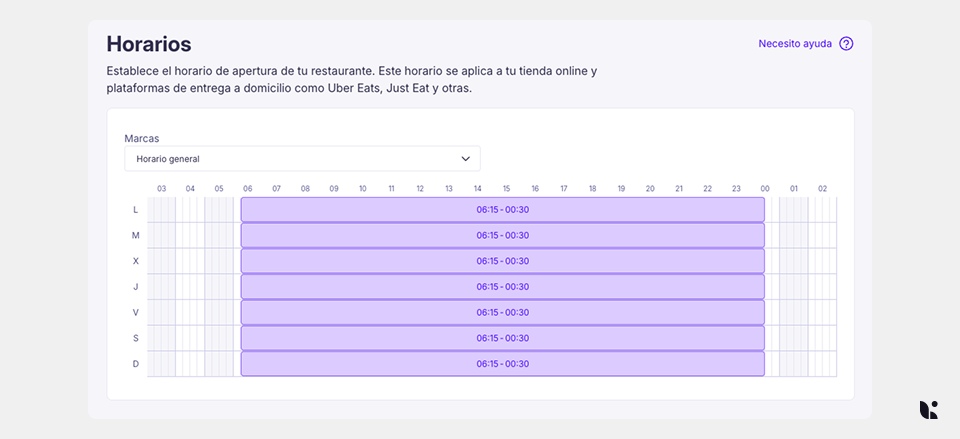
New schedule editor in Admin
We've updated the schedule manager to make it easier to use and clearer in the day-to-day. This change applies to location and booking schedules.
What's changing
- Visual editor with drag & drop in 15-minute intervals.
- Better mobile adaptation, with a clearer list view.
- Design improvements to ensure you don't lose changes if you leave without saving.
- Day initials shown in the user's language.
- Alert when the configured schedule differs from the brand's general schedule.
New section for Verifactu
We've added a dedicated section in Legal Entities for activating Verifactu. This lets customers prepare and activate this feature directly from their own admin.
End of support for Windows 7 and 8
From 31 March, Last.app will no longer be compatible with Windows 7 and 8.
- Sessions will be closed automatically on devices running these versions
- In the event of an issue, please contact support
Summary
This update strengthens three key areas:
- Customer communication → more control in Take Away
- Commercial management → more flexible and segmented promotions
- Daily operations → usability improvements in the admin