Manage your Google Business Profile from Last.app

Google is one of the first points of contact between a customer and a restaurant: that's where your reviews, opening hours, menu and delivery or pickup buttons show up. Until now, managing that information meant logging into a separate Google tool outside Last.app.
The Google Business Profile integration is ready and connects your Google listing directly to Last.app. It's rolling out in beta, so it'll reach every customer gradually over the next few weeks. Once it's available on your account, you'll be able to connect it from the Last.app Marketplace and, from there, manage all of that information directly from LastAdmin, without having to open Google Business Profile separately.
If you don't see the option to activate it yet, don't worry — access is rolling out gradually and will reach your account soon too.
All your reviews, in one place
The reviews your restaurant gets on Google update automatically in your Last.app panel throughout the day, without you having to go looking for them on Google. You can reply to them or delete a reply directly from LastAdmin. And replying fast, whether the review is good or bad, says a lot about a restaurant to someone who hasn't walked through the door yet.
Business information, synced with Google
Category, description, phone number and service options (takeaway, delivery, dine-in) are edited from Last.app and published directly to your Google listing. Category, specifically, is what Google uses to decide which searches you show up in — so keeping it in the same panel where you manage the rest of the restaurant stops it going out of date.
Website and social media, connected to your listing
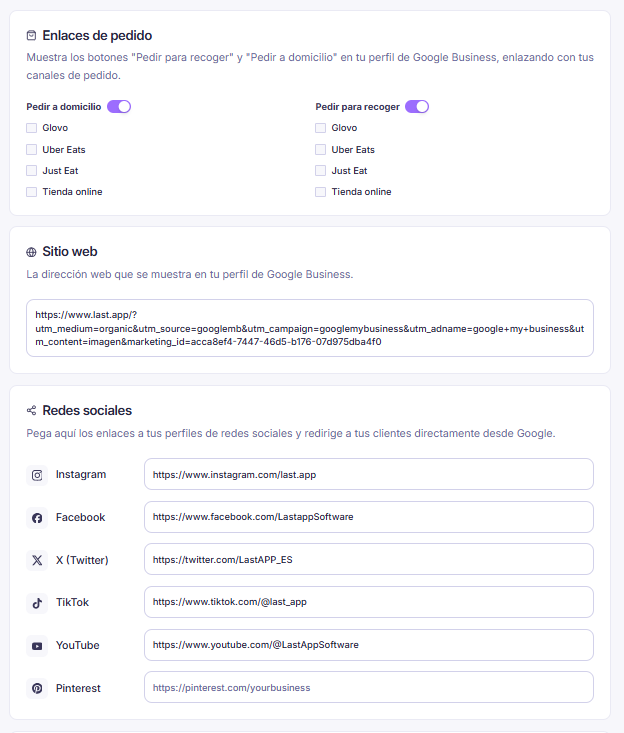
The link to your website or online store, and any social media profiles you want to show, update from the same section and publish directly to your Google listing. That way, a customer who discovers you on Google ends up exactly where you want to send them — not on an old website or a profile you no longer manage.
Catalogue synced with your Google listing
You publish one of your Last.app catalogues directly to your Google listing, photos, prices and allergens included. From there it stays in sync: any price change in Last.app updates on Google too, so you never have to republish it or keep the menu in two separate places.
Order buttons connected to your channels
The Order delivery and Pickup buttons on your listing turn on or off independently, and each one connects to the channel you choose: in Spain, Glovo, Uber Eats, Just Eat or your own online store; in Mexico, Uber Eats, Rappi, Didi Food or your own store. If you're already using Last.app's Delivery Hub to centralise your external orders, the order comes in through that same channel the moment the customer decides — straight from a Google search.
Posts, directly on your Google listing
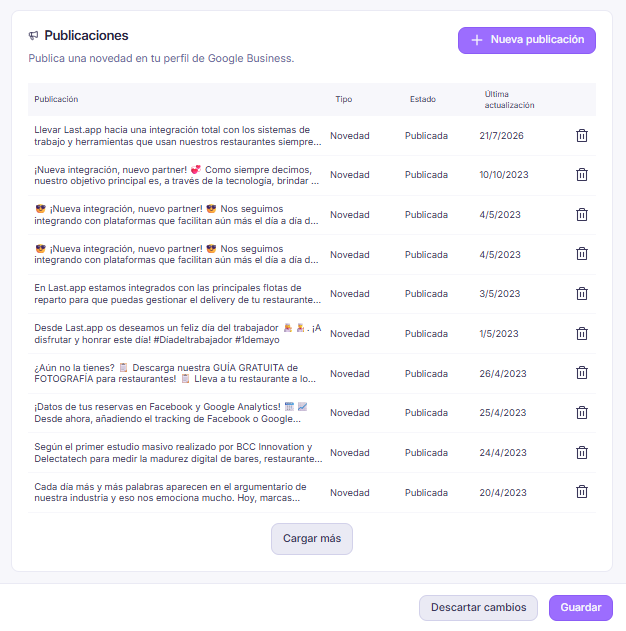
You can create, edit and delete posts, offers and events on your Google listing from LastAdmin, each with text, a photo and, if you want, an order button. Standard posts stay visible for 7 days; events and offers stay up until their end date. It's a direct way to keep your listing active, and to turn someone who was just looking at your restaurant on Google into an order or a booking.
What's next: opening hours and analytics
Two features are in development and can't be turned on yet. Opening-hours management will publish the hours you have in Last.app directly to Google; today it shows as Coming soon in the panel. Later on, we'll also bring Google's analytics (views, searches, calls, how people find you) into Last.app, so you can measure your listing alongside the rest of your data.
We'll keep expanding this integration, in countries and in features, as we validate it with more restaurants. See you in the next update.