The new Last.app Shop: more personalization, more speed, more control

Today we're rolling out one of the biggest updates we've made to Last.app Shop. And it's not just a new layer of design — we've touched major parts of personalization, performance and the mobile experience, but we've also added many of those small features you'd been asking for over time, the ones we had on our list.
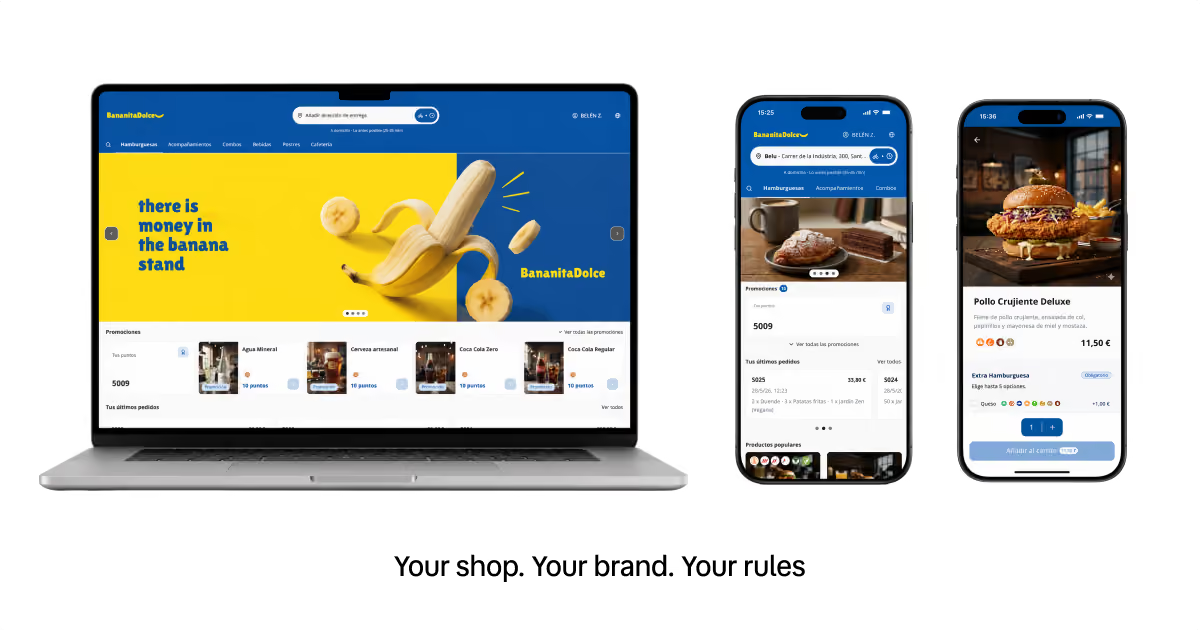
Your online store shouldn't just be a place where customers come in, look at the menu and place an order. It should look like your restaurant, work well on mobile, help you sell better, and give you more control over everything that happens before, during and after every purchase.
In short, you can now make your Shop look more like you, load faster, guide the customer better, and help you drive more orders without complicating your operation.
A store that feels more like yours from the first glance
We've given some extra love to the visual side of your Last Shop. Now your store adapts better to your brand using your colors, your logo, your cover image, and also new Google fonts, so you can fine-tune the personality of your online store even further. Buttons, headers, text and visual details now match your identity more closely, so the store doesn't look like just another template, but a snapshot of your restaurant.
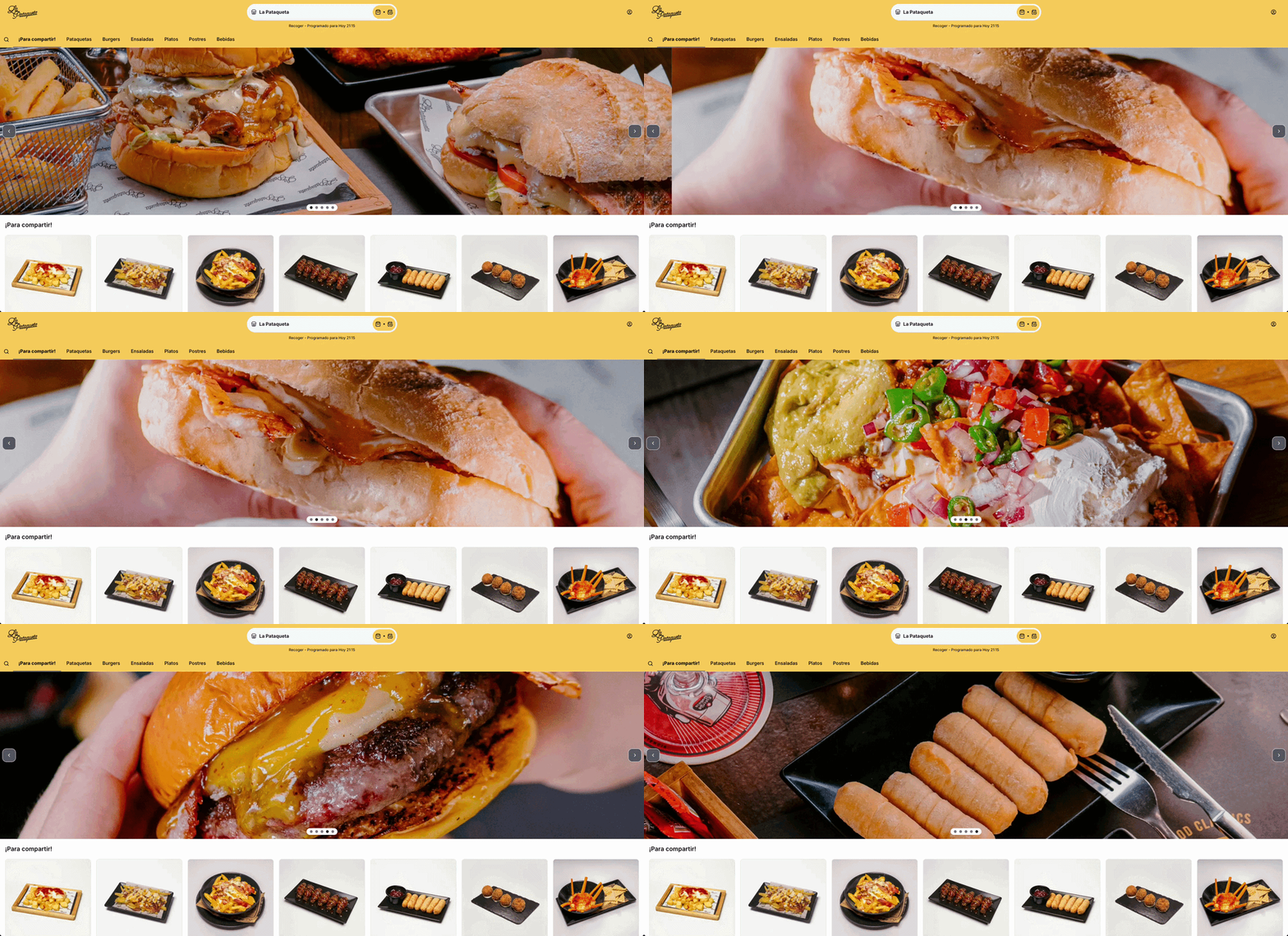
We've also improved the cover. Until now, the main image worked as a single banner. Now you can turn that space into a carousel with multiple images — ideal for showcasing different products, special menus, seasonal campaigns, promotions, or simply different sides of your brand's personality. This turns the first screen into a fuller, more dynamic showcase.
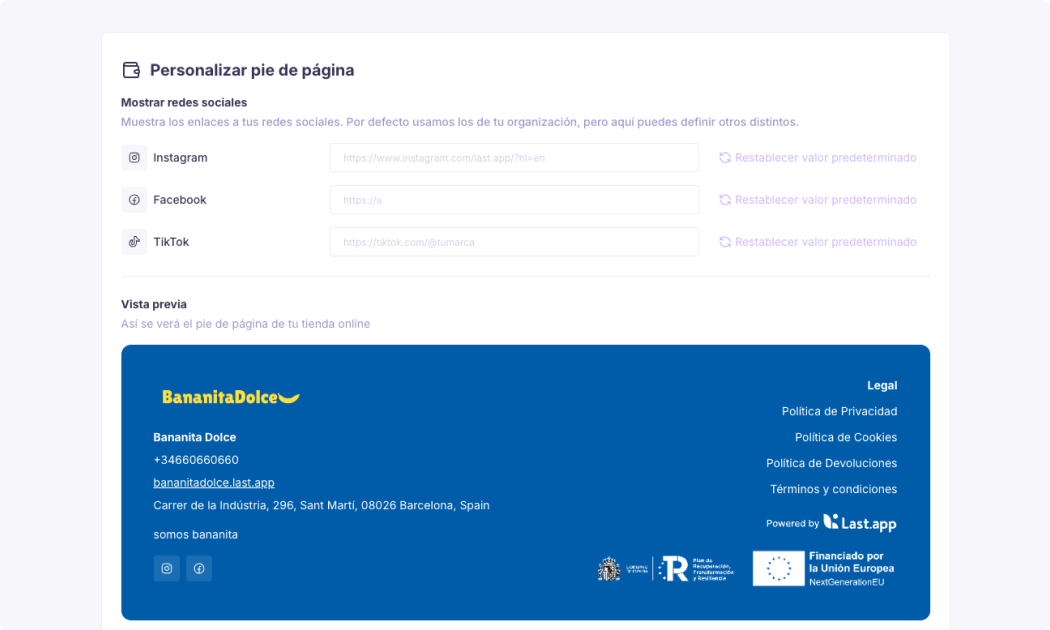
You can also now customize your store's footer in more detail. You can add your own text, include links to your social media, and work that final part of the page so it also carries context, brand and points of connection with your customers.
Smart sections to show what helps you sell the most
The new Last Shop website includes smart sections you can turn on or off depending on what you want to show. You can display the cover image, reviews, best-selling products and recent orders, so your store is not just an online menu, but an experience more focused on helping the customer decide.
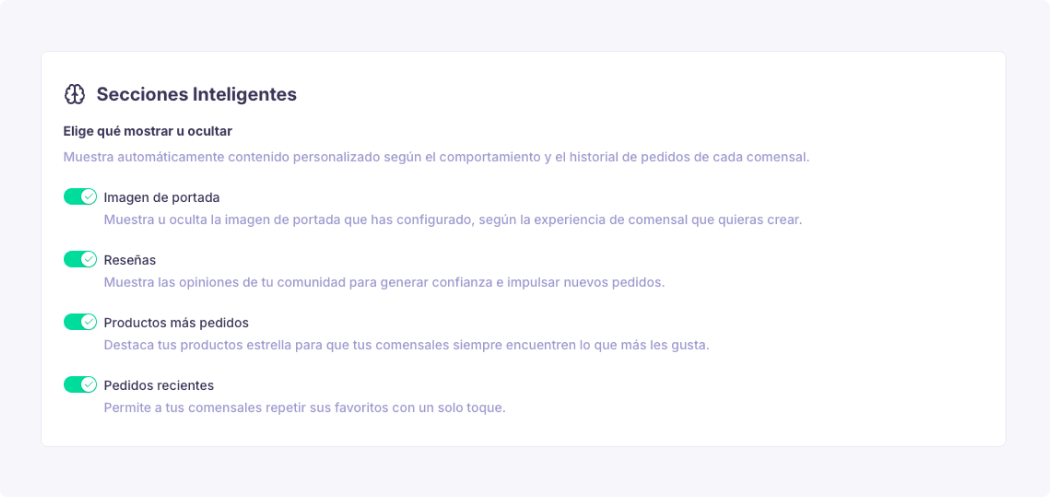
Reviews help build trust, especially for new customers arriving at your store for the first time. Best-selling products help highlight what already works well and what other customers will probably also want to try. Recent orders make it easy for a regular customer to reorder what they already liked without having to search for it again.
Not every restaurant needs to show the same thing. Some businesses will want to give more weight to the visual side, others to star products, and others to repeat ordering. Now you have more room to adapt your store to your way of selling and to the way your customers buy.
An experience designed mobile-first
The new Last Shop has been rebuilt with the phone in mind from the start. Because in practice, most customers don't reach your store from a computer, but from a link on Instagram, a Google search, a WhatsApp message, or a QR code scanned at the restaurant.
That's why the experience now feels much smoother on mobile. Transitions between pages are softer, product pages have been redesigned with cleaner navigation, images have been optimized for better sharpness and load time, and modifiers are now shown more clearly so choosing extras, sizes or preferences doesn't become a hassle.
Product cards have been redesigned for small screens, the cart behaves better on mobile and adapts as a side panel on desktop, allergens now appear in their own space so they don't clutter the main product page, and specific iOS behaviors have been fixed, such as the back gesture, zoom lock, or small transition issues.
The idea is simple: ordering from the Shop should feel more like using a well-designed app and less like browsing a heavy website.
Recommendations to complete the order
There are also new ways to work cross-selling better inside Last Shop, without having to set up each recommendation manually. We've built an algorithm that analyzes your menu and lets suggestions appear automatically at the moments when they make the most sense, helping the customer complete their order in a natural, fast and much more optimized way.
This can be used to offer drinks, starters, desserts, extras or products that pair especially well with certain dishes. For example, if someone is ordering a burger, it might make sense to suggest fries, a drink or a dessert before finishing the order. The difference is that you no longer have to build all those relationships one by one — Last Shop works on your own menu to spot opportunities and make the most of everything you already have available.
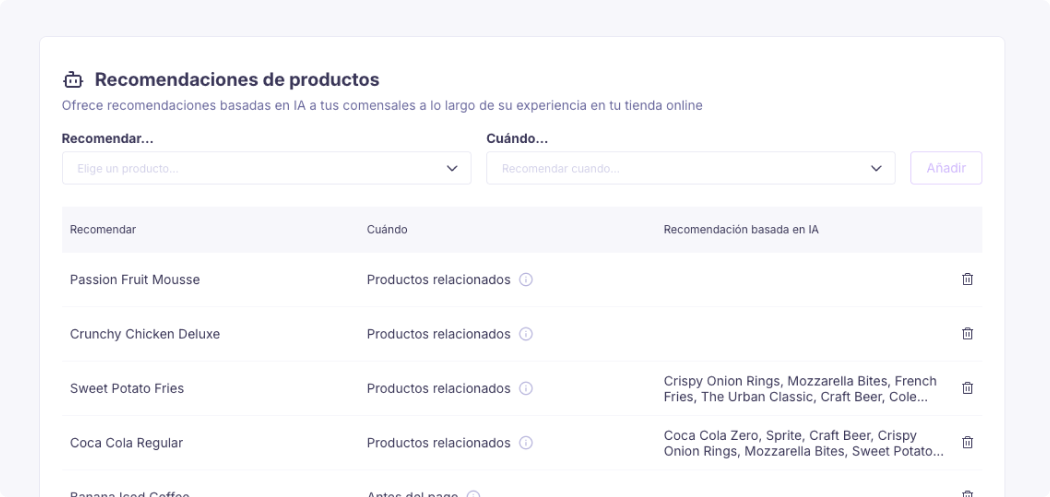
A more complete, faster checkout, better prepared for regular customers
Checkout has also been rebuilt to modernize its payment system. Last Shop still supports payments with saved cards, promo codes, automatic discounts, loyalty points at checkout, delivery zone control and minimum orders — but now all of it lives on a cleaner, faster experience that's better adapted to mobile.
We've also added Apple Pay to Shop so customers can pay even more comfortably, quickly and securely, without having to enter their card details every time. It's an especially useful improvement on mobile, where every extra step can make the difference between completing an order or abandoning it.
You can also hide the tip option at checkout. Because asking for a tip can make sense for some concepts, but not for every restaurant, market or buying experience. Now you can decide whether to show that option or not, adapting the final step of the order to your brand and your customers.
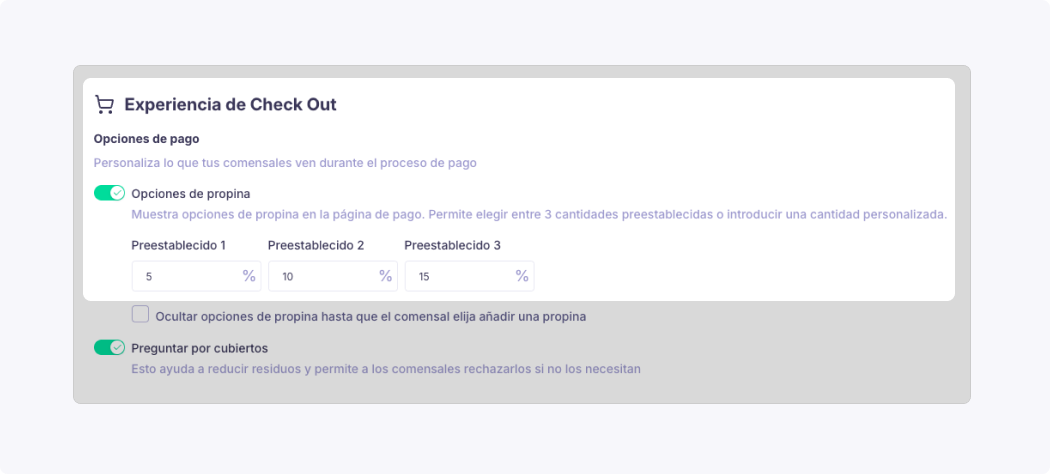
And after payment, there's an especially important new feature: a Thank You page with a unique URL. This lets you correctly measure conversions in Google Ads and Meta Pixel when you run paid campaigns. So now it's much easier to know which campaigns actually end up generating real orders.
A more useful customer account
Repeat customers also get a more complete experience. The customer account now includes a detailed order history, saved addresses, saved payment methods, loyalty points balance, personal data, password changes, account deletion, and a review flow after the order.
This gives regular customers a real space inside your store. They don't have to re-enter their address every time — they can see their past orders, check their points, and manage their data more easily.
For the restaurant, this means less friction on repeat purchases. For the customer, it means a more comfortable experience. And in delivery or takeout, that comfort can make quite a difference.
Messages and reminders to better accompany every order
Communication is key in any sale, so we've added new messages and reminders related to order confirmation and tracking, for both the online store and takeout. We've also added notifications linked to reviews and the customer experience.
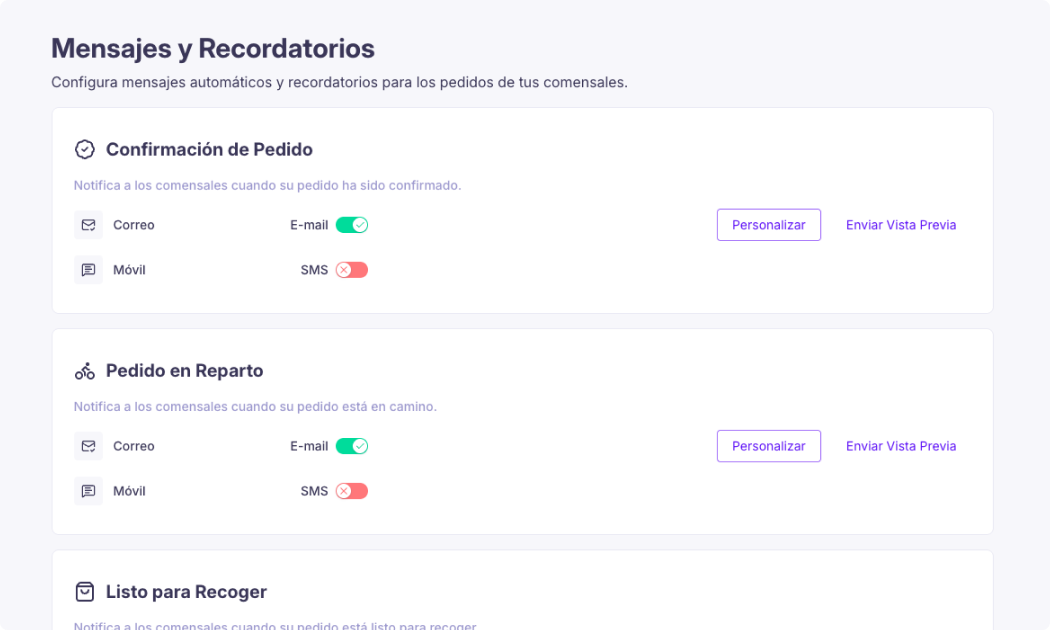
This helps customers avoid feeling like they placed an order and it vanished into thin air. They get more context, understand better where their order stands, and after the experience, they can leave a review or share how it went.
Also, when a customer rates an order with 4 or 5 stars, they can be redirected to leave a public review on Google. This logic already existed for reservations and now also reaches Shop orders, helping turn good experiences into public reviews.
More speed, better SEO, and links that share better
Now for the slightly more technical improvements.
Last Shop has also been built with performance and visibility in mind. Categories are now part of the URL, for example with structures like /menu/burgers, which lets Google index specific sections of your catalog and not just the main page.
Open Graph tags on pages have also been improved, so when someone shares a link on WhatsApp, Instagram or other channels, the preview shows an appropriate image and title. This helps your links look more professional and appealing outside your website.
We've also optimized technical details that directly affect the mobile experience — font loading, image preloading, API connection, reCAPTCHA loading strategy, and other points designed to make the store feel fast even on mobile data. In practice, this means more speed, and it's easier to be found and to turn visits into orders.
More online presence and better domain management
Inside the online presence tab, you can now see your domains and manage them more clearly. This helps you have more control over how your store is found and shared — something especially important if you use the Shop as your own sales channel.
You can also edit your site name, though not the full domain format "site-name.last.shop". In other words, you have room to adjust how your store is presented, while keeping the technical structure that makes everything work correctly.
We're also working to make custom domain management increasingly self-service, reducing the need to contact support for changes that should be possible directly from the panel.
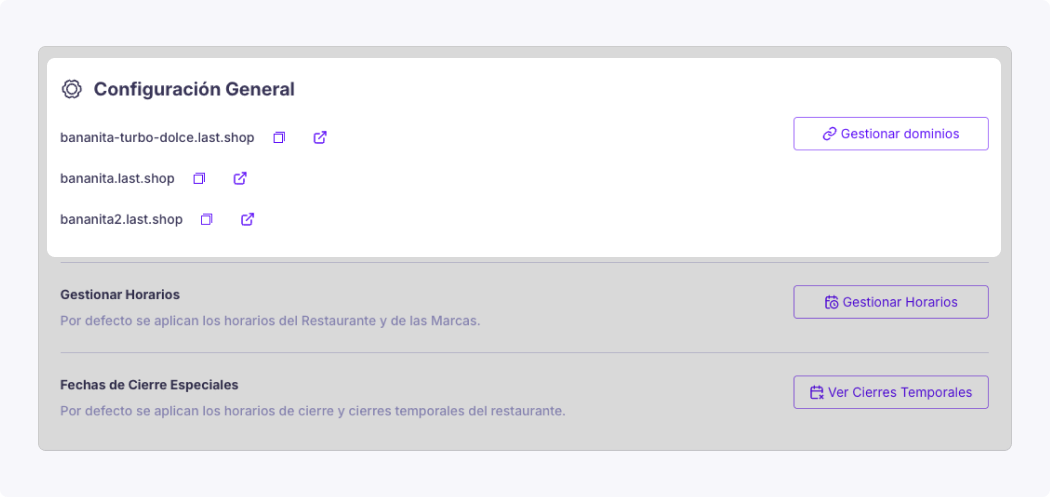
More control over your store's status
Now you can see your store's status directly from the Shop settings. If it's open, you'll see it clearly. And if it's closed, you can also see why.
This is especially useful when something isn't working as expected and you need to quickly understand what's happening. It could be a schedule, a manual closure, a setting, or any other factor affecting store availability. The idea is that you get more visibility and don't have to guess why your customers can't place an order at that moment.

More useful order emails for your operation
We've also improved order notification emails. They now include the order number in the subject line and show which location the order came from — something especially important for operators with several locations.
Before, if you managed more than one location, it could be hard to tell from your inbox which location each order belonged to without opening the email. Now that information is clear from the very first moment.
The customer's name and phone number also now appear directly in the order email, so the team can call if needed without having to go into the dashboard first. Small changes, but very practical when you're mid-shift and need to sort something out quickly.
Your own scripts and analytics from the panel
You can now also add tracking scripts directly from the settings, without having to contact support. You can connect tools like Google Analytics, Google Tag Manager or Meta Pixel to better understand what's happening in your store and measure the impact of your campaigns.
This lets you know which products are viewed, what's added to the cart, where payment gets abandoned, and which orders are completed. It also makes it possible to build funnels, measure campaigns, and better analyze the performance of your online channel.
And since all tracking works with cookie consent, measurement respects the customer's choices and only activates when appropriate.
When will it be available?
The new version of Last Shop is already available, and we're rolling it out progressively. Since this is a major update, we've decided to launch it in stages, to make sure the rollout is stable, that every part works correctly, and that the transition is as smooth as possible for every restaurant. So if the new version hasn't reached you yet, don't worry — you'll have it available very soon.
Our goal isn't simply to turn on new features, but to do it right. That's why we're following the rollout step by step, checking that the visual experience, checkout, settings and new personalization options fit correctly in each store before moving on to the next group.
This way, we make sure the change arrives in an orderly way, without unnecessary interruptions, and with a transition designed so you can start taking advantage of the improvements with confidence from the very first moment.
See you in the next update.