Everything new in The Book: more control over your bookings and your guests

A restaurant's bookings don't all come in the same way, and they don't all need the same handling. A booking that comes in through your website ten minutes before closing isn't the same as a call from a regular who knows you'll always find them a table. And a Saturday night doesn't run on the same terms as a Tuesday lunch.
That's why we've kept building out The Book, Last.app's booking system, around three ideas. You decide how bookings come in on each channel and for each service. Every booking you accept is better protected against no-shows, wherever it comes from. And your team knows who's sitting at the table before they arrive. Here's what's new, and what it means for your floor day to day.
Everything new at a glance
- Different booking rules for each service, day or special date
- Rules your website always follows and your team can override when needed
- Pause online bookings and still take them by phone
- Guest profiles with history, spend, tags and notes
- Ask for a card or deposit on Google bookings too
- Send a link to collect the deposit on phone bookings
- A cover limit per time slot, so the kitchen isn't overwhelmed
- Bookings every 15 minutes and durations that fit your service
- Choose which zones can be booked, like the terrace or dining room
- One screen with the day at a glance: bookings, covers and peak times
- See on the POS how many tables and covers you have right now
- The day's bookings next to the floor plan
- A bookings-only login for staff who don't need sales or reports
- Confirmations and reminders by email, SMS and WhatsApp
- A message from the restaurant on your Google booking page
- Bookings and POS as separate sections in the admin menu
Coming soon: booking approval for large groups, and booking bots for phone and WhatsApp.
Different rules for each service, day or date
With multiple booking policies, you're no longer tied to one set of rules for the whole week. You can create several policies, each with its own booking window, maximum party size, and guarantee and cancellation terms. Then you assign them to services, days of the week or specific dates under Reservations in your admin panel. That way you can ask large groups for a guarantee on Saturday night and take bookings right up to the last minute on Tuesday lunchtime, without changing the settings for the whole restaurant.
Special dates work the same way. For New Year's Eve or a private event, you set terms for that day only, and the rest of the calendar stays as it was.

Strict or flexible rules, depending on what you need
Each booking rule can be strict or flexible. If a rule is strict, a booking that doesn't meet it can't be made. If it's flexible, your team sees a warning on the POS or in the admin panel and decides whether to go ahead. Online bookings always stick to the rules exactly as you've set them. So if you don't take website bookings with less than an hour's notice, your manager can still take that last-minute phone call when they know there's room.

Along the same lines, you can now pause online bookings without cutting off bookings from other channels. When tonight's service is almost full, you switch off website bookings, and your team can still take a phone booking if they see room.
What does your team know about the person booking?
With the new guest profiles, your team can see each person's full history, not just today's booking. Each profile brings together their past bookings, bills and total spend, plus their preferences, allergies, birthday, tags and notes. That information also shows up in the booking and bill views during service. When a regular books for four, your team already knows they prefer the terrace or that someone at the table has an allergy, without having to ask again.
Tags and filters also help you get to know your business better. You can group your regulars, your biggest spenders or the guests who come in midweek, and plan what to do for each group using information you already have.

Guarantees and deposits, on Google and by phone too
Guarantee and cancellation policies no longer stop at your booking page. When someone books through Google and your restaurant has a policy set up, they're taken to The Book to accept the terms and either leave their card as a guarantee or pay the deposit. Google bookings are now protected by the same rules as your website bookings.
For phone bookings, your team can send the guest a payment link so they can pay the deposit from their mobile. If the payment doesn't arrive within the time you've set, the system can free up that space for another booking. No separate charge to take, nobody to chase, and no table held without a guarantee.
Availability that fits your floor and your kitchen
A restaurant's capacity isn't just about free tables. With cover limits per time slot, you set how many people can come in during each slot, not just how many tables you have. If your kitchen is comfortable with 35 covers per slot, that's your limit, even if the dining room could seat more.
You can also organise arrivals into fixed sittings and set times and durations in 15-minute intervals. If tables at lunch usually stay occupied for 45 minutes, you set exactly that. Your forecast of how busy each slot will be then gets much closer to what actually happens in service.
Customisable zones let you decide which spaces can be booked and how guests see them. You can split the dining room into several areas to organise your team and still show guests a single space. Zones also sync with Google, so guests can choose where they'd like to sit when they book there too.
Get ready for service and track it from the POS
The new booking overview puts everything you need before service on a single screen. You can see the day's bookings, the covers expected today and this week, your no-show rate, how busy each hour looks, your services and recent activity. If you know the rush hits at 2.30pm, you can add staff on the floor or rearrange tables before it starts.
During service, your team can check occupancy and covers in real time from the Last.app POS, broken down by service, without opening the admin panel. The information sits where the decisions get made: on the floor.
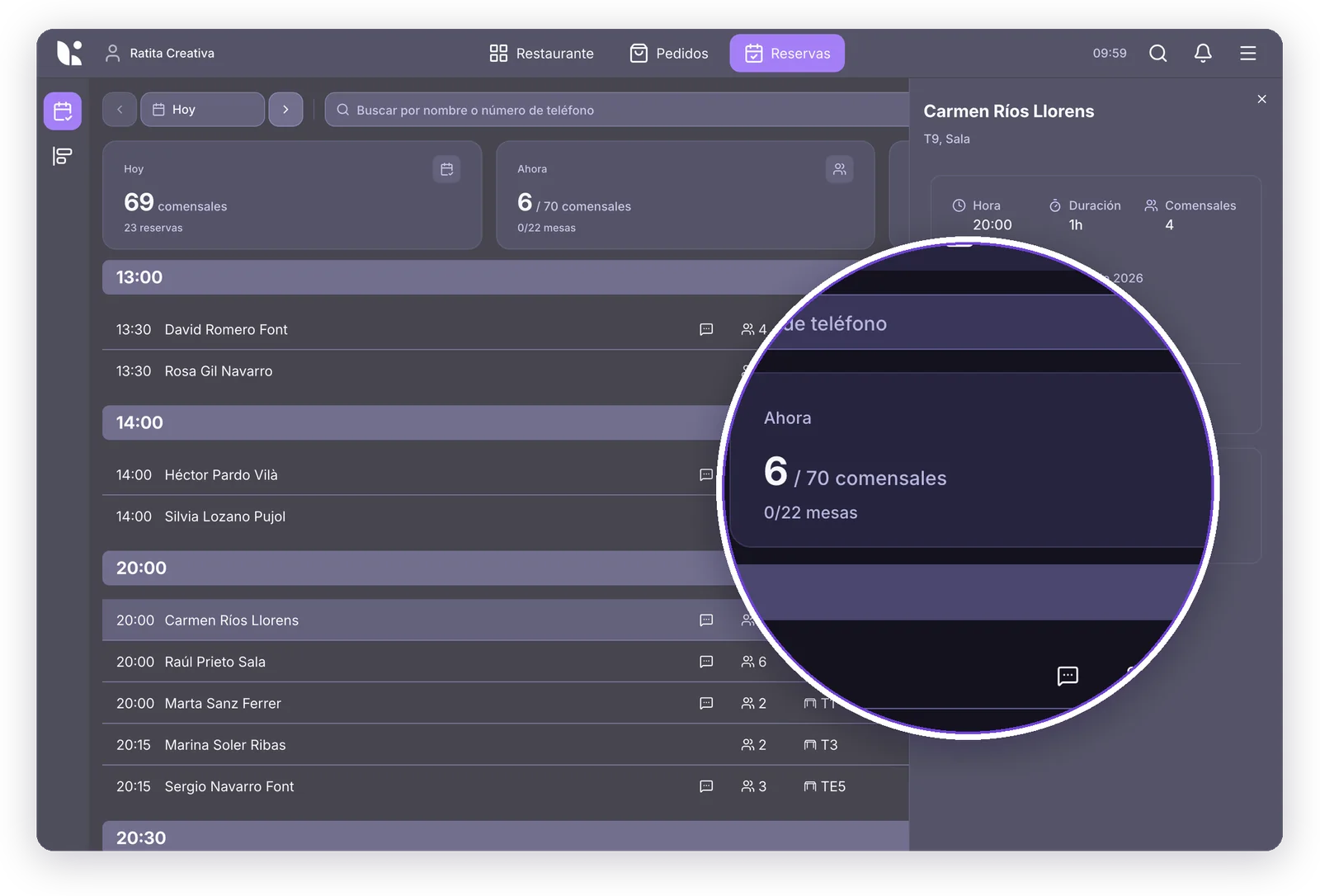
And on the floor plan, a side panel shows the day's bookings and open bills right next to the tables. Your team can see who's about to arrive and which open bills haven't been assigned a table yet, without switching screens mid-service.
Other changes to your day-to-day
Alongside the big updates, there are a few smaller tweaks to save your team some steps:
- A bookings-only role: when you give someone access to the admin panel, you can choose the new Booking Manager role. Whoever greets guests and organises the tables gets what they need, without seeing sales, reports or the restaurant's settings.
- Confirmations and reminders on several channels: your guests get their booking confirmation and reminder by email, SMS or WhatsApp, which helps cut down on forgotten bookings.
- Your own message on Google: you can add a message from the restaurant to your Google booking page, with any instructions or terms guests should know about.
- A tidier admin menu: Reservations and POS now appear separately, so you can find what you need faster.
Which plans include it?
The new features are spread across the plans for The Book, and plan prices stay the same. Multiple booking policies, Google bookings and your booking website are included from the Core plan upwards, and guarantees and deposits are part of the Premium plan. The Basic plan is still free for restaurants that use the Last.app POS.
What's next: large-group approval and booking bots
There's more on the way, though it isn't available yet. First up is booking approval for large groups. If your maximum per booking is 8 people and someone wants to book for 10, they'll still be able to request it. The booking then stays pending until your restaurant approves it. That way you don't lose a large group to a limit designed for everyday service, and the final say is still yours.
We're also working on a bot that answers booking calls and another that handles bookings over WhatsApp. We'll share more here as soon as they're ready.
The goal isn't managing bookings for the sake of it. It's about your team spending less time organising them and more time with the people at the table.